Usher
An AI-powered mobile app that bridges Canvas coursework and library resources, automatically matching relevant academic materials to student assignments to solve the discovery problem
My Role
UX/UI Designer
Timeline
8 Months
Responsibilities
End-to-end design process
User research & interviews
Information architecture
Visual design & prototyping
Usability testing with 6 students
Tools Used
Figma (UI Design, Prototyping)
Miro (Research Synthesis)
ChatGPT (Text rephrasing)
Gemini (Image generation)
Photoshop (Image editing)
Notebook LM (Video generation)
Overview
Despite universities investing millions in library databases and academic resources, students are turning to Reddit and other unreliable websites for homework help. This isn't because students are lazy or because libraries lack quality materials it's because the current system makes discovery nearly impossible.
The Gap
To understand the broader context behind this disconnect, I reviewed existing research on how students approach academic research today.
The data revealed a troubling pattern: 78% of students struggle to identify credible academic sources online, and most default to familiar tools. Nearly 89% begin their research with search engines like Google, while only 6% actively use university library databases. Even when students face challenges, just 20% seek help from librarians.
These patterns highlight a growing gap between available academic resources and how students actually search for information, setting the stage for deeper exploration through primary research.
The Solution
Based on these insights, the goal was not to redesign the library itself, but to rethink how students access it. USHER is an AI-powered mobile companion that automatically connects Canvas assignments to library resources, eliminating the search step entirely by:
1. Canvas Sync: Direct integration pulls assignment titles, descriptions, and due dates
2. AI Matching: Algorithm analyzes requirements and matches library metadata without students writing a single search query
3. Smart Notifications: Push alerts deliver "We found 5 new resources for 'Urban Planning Research Paper' with 94% relevance match"
4. Mobile-to-Desktop Flow: Discover on phone, access on laptop via email/text links on every resource
Instead of asking students to adapt to complex systems, USHER meets them within their existing academic flow—turning the library from a destination requiring navigation skills into an invisible guide that appears exactly when needed.
Research Approach
To move beyond assumptions and understand real student experiences, I conducted in-depth interviews with 12 students across different departments from Architecture to Medical to UX Design. These conversations revealed not just what students do, but why they avoid library resources despite needing them.
I shared synthesized findings with the Director of the University Library. This institutional perspective revealed operational constraints I needed to design around, like limited IT resources for complex integrations and content licensing restrictions. Together, these perspectives formed the foundation for the insights and design decisions that followed.
Key Insight 1: Students Use Library for Everything Except Research
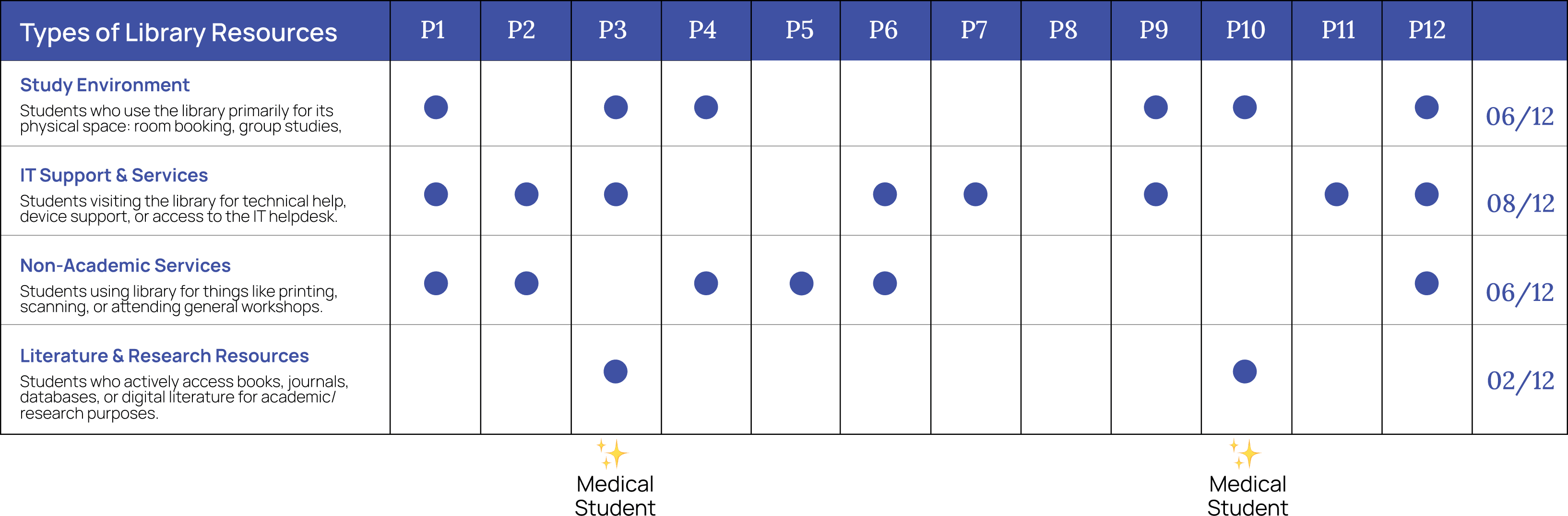
Only 2 out of 12 students actively used library literature resources for academic research, the core function libraries are designed for and both of these students belonged to Medical program. Most came for printing, group study, or IT support.
Key Insight 2: Navigation issues emerged as the main barrier to library resource usage, outweighing awareness gaps.
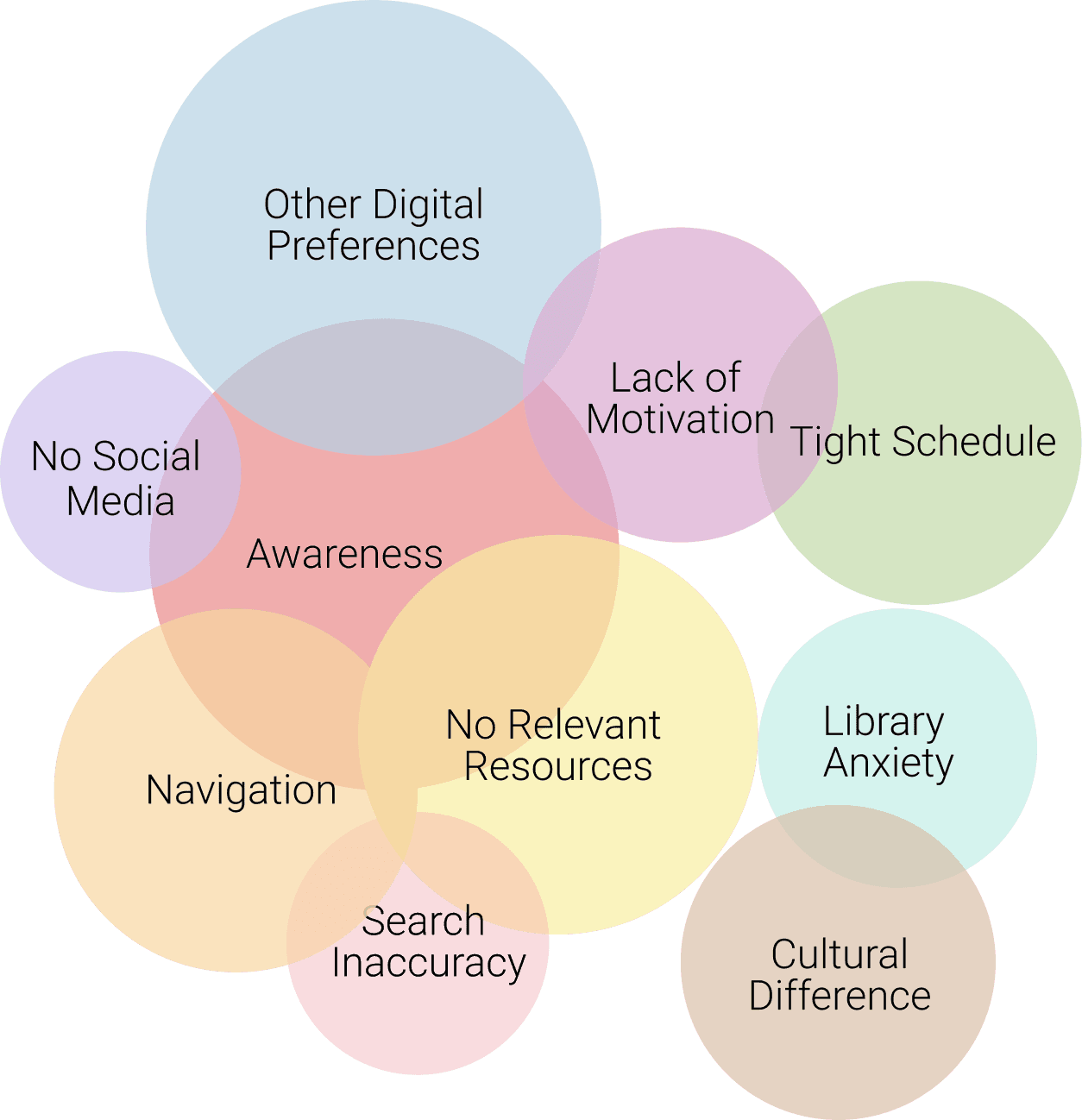
After analyzing how students use and avoid library resources, I mapped the challenges they face alongside the reasons they shared for not using them.
While awareness initially appeared to be the common thread across multiple issues, deeper analysis showed that navigation was the underlying factor. Difficulty finding relevant resources and unclear search paths created friction that discouraged continued use.
This insight shifted the focus of the project, making navigation the core problem to address moving forward.
These student reflections reinforced a consistent pattern across the research. While awareness of library resources existed, navigation challenges repeatedly surfaced as the primary reason students avoided using them. Time spent searching, unclear pathways, and difficulty locating relevant materials created enough friction to push students toward alternative tools.

“To go to the library, it like takes you an effort to walk all the way to the library… time is more valued when you're doing it digitally.”
Participant 2

“I have sometimes spent maybe 1 or 2 hours just finding a book or maybe a thesis… it’s time-consuming, so I prefer online.”
Participant 1

“Even the website, it's kind of tricky. We are not able to easily find where the things are… it's very difficult to find out.”
Participant 5
This synthesis helped clarify the core problem and directly informed the final problem statement for the thesis, shifting the focus from awareness to reducing navigation-related friction.
How might we reduce the navigation friction university students face when trying to discover and engage with credible, course-aligned library resources?
Design Decisions
Meet Students Where They Are
Students live in Canvas to track deadlines and assignments, often viewing the library as a disconnected, complex system. Instead of expecting students to leave their established workflow to search for resources, I decided to bring the library to them through a mobile-first experience that integrates with their daily habits.
Why? Students discover resources in micro-moments on their phones but usually need laptop access for deep research. I designed a seamless handoff to bridge this gap: students discover content via mobile push notifications or AI matches, then can instantly access the material on desktop via email links, connecting discovery to delivery.
Making Resource Availability Visible at First Glance
During user testing, a staggering 10 out of 12 participants mentioned they believed there were "no resources" available for their specific courses—a perception that was factually incorrect. The interface needed to actively combat this "resource blindness" and prove its value immediately upon login.
Why? To validate the library's utility, I redesigned the home screen to prominently display big quantitative counters (e.g., 232 Books, 125 Articles) alongside subject-wise curated collections. These high-level metrics serve as immediate visual proof of abundance, helping students realize just how much material is actually available for them.
Redesigning Discovery to Reduce Cognitive Load
With shrinking attention spans, modern students instinctively skip over interfaces that appear text-heavy or academically dense. Initial concepts that mimicked traditional database lists were failing because they required too much cognitive effort to parse, causing students to abandon the search before they started.
Why? I shifted the UI paradigm to a "Netflix-style" discovery model that students are already comfortable with. By utilizing cover art, horizontal scrolling, and bite-sized descriptions, the app presents information in a digestible format. This familiar interaction pattern lowers the barrier to entry, encouraging browsing rather than intimidation.
Conclusion
Biggest Learnings:
The most important learning from this project was realizing that what initially appeared to be an awareness problem was actually a navigation issue. Deep analysis of student behavior revealed that friction in finding relevant resources, not lack of interest, was the primary barrier to library usage.
What Worked
Conducting research across multiple student departments provided diverse perspectives.
Validating student insights with the library director helped align user needs with institutional constraints.
Anchoring design decisions in research prevented solution bias and feature overload.
What I Would Do Differently
Test navigation concepts earlier using low-fidelity prototypes.
Involve institutional stakeholders sooner to surface technical and operational constraints earlier.
Narrow the solution scope faster through quicker validation cycles.
Next Steps
Expand usability testing with a larger and more diverse student population.
Explore deeper integration with existing academic tools such as learning management systems.
Measure long-term engagement to evaluate whether improved navigation leads to sustained library usage.